

The ‘Do you need server-side tagging’ calculator gives you a ‘Yes/Not Yet’ answer, based on 6 questions.
However, there isn’t a ‘one solution fits all’ implementation of server-hosted Google Tag Manager. Although the general architecture is the same across implementations, the benefits can differ, depending on how you choose to implement your tracking set-up.
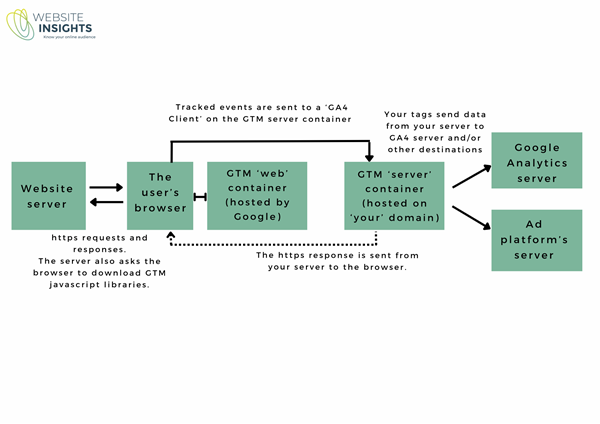
Potential benefits of server-side tracking
- One set of tags getting data from the browser is better for website performance.
- You have control over what you send on to the destination platforms, so there is less risk that you are sending more data than you intend.
- You can maximally respect users’ privacy, by opting for a set-up where advertising pixels are not accessing the browser at all.
- Browsers are less likely to block requests or shorten cookie life. This means more signals will be sent to advertising platforms for conversions to be matched with users. You will probably see a lift reported conversions for the ad platform (through better attribution), but also more conversions (through more signals for ad optimisation). If your goal is to maximise conversions, your set-up will probably include pixel tracking and server-side tracking to maximise signals.
- You can extend the life of specified cookies. Extending cookies is useful when the conversion doesn’t happen in the same session as the ad was clicked, leading to more accurate attribution of conversions.
- More options to augment conversions sent to ad platforms with user-provided data, meaning more signals will be sent to advertising platforms for conversions to be matched with users.
- Bot detection, with the possibility of filtering out traffic likely to be from bots before sending to GA4 and ad platforms.
- Ability to send offline conversions to GA4 and ad platforms.
- Ability to send refund data to GA4 (to correct purchase numbers).
The benefits related to conversion tracking accuracy and conversion optimisation offer an improvement on your existing situation. Whether this translates into a significant business benefit will depend on a few factors (and that is what the calculator is trying to help you with).
Note that reduction in blocking of tracking does not mean any change to your obligations to get user consent for cookies, if you are in a region where this is a requirement. Nor does it alter your obligations to disclose data collection and use in your privacy policy.
Before implementation – requirements gathering and sign-off
I have had clients who suggest they need server-side tracking, but they are not entirely clear on why they need it. There isn’t just one universal ‘server-side solution’ – each implementation will differ, depending on the client’s requirements. Therefore, an agreed set of requirements is really important to guide the solution design.
Which of the above benefits do you want from server-side tagging?
- Is improved ROI on ad spend your main requirement? This solution will look different from one where the main goal is control over what data is sent to ad platforms. For example, for Meta tracking, the first would use both a Meta tracking pixel and a Meta server tag, while the latter would use only the Meta server tag.
- To what extent do we need to audit and update the current web GTM tags? The server-side implementation is based on the current GA4 web tags so, unless the implementor is already familiar with our current set-up, this will be an early step.
- To what platforms do you need to send data?
- Do you want to send offline purchase data to ad platforms? Do you want to send refund data to ad platforms? These add another chunk of design and implementation to the project.
- Is there a requirement to get user consent for cookies? If so, is a cookie management platform already in place?
- For GA4, do you want to run web tracking and server-side tracking in parallel for a while to validate the server-side implementation?
More requirements means more cost, so you will want to settle on a scope before the implementation starts.
Implementation phase
Before the tag implementation work starts, you (or your implementor) will need to set up a few things.
You will need to set up an account with a hosting provider. If using Stape, your implementor will be able to set up the account and share it with you.
You will need a subdomain that has the same domain name as your website. This will become the web address of your server Google Tag Manager container. Your webmaster will be able to set this up by adding a DNS record (provided in your Stape account) to your website server.
After that, the implementation is done in your web GTM container, your server GTM container and your Stape account.
Testing, as always, is an important part of the implementation.
What are the costs involved in implementing server-side tracking?
There will be 3 parts to the cost:
An ongoing cost for hosting your server Google Tag Manager. If using Stape, pricing is in bands, depending on server usage, starting from USD 17 per month.
An implementation cost will depend on the scope of your project.
You should also allow for an ongoing maintenance cost, for your set-up to be monitored and tags updated as needed.